A Practical First AI Automation Project for a Small Business
Learn how to choose one repetitive process, design sensible human checks, and measure whether automation is genuinely saving your team time.
AI automation can be useful for a small business, but it is easy to begin in the wrong place. A broad instruction such as “use AI across the business” creates a technology project without defining a business problem. A better first project is usually one repetitive process that already has clear inputs, a responsible owner, and an outcome the team can check.
The aim is not to remove people from the process. It is to reduce avoidable copying, sorting, and follow-up so people can spend more time on work that requires judgment.
Start with a Process, Not a Tool
Look for a task that happens frequently and follows roughly the same steps each time. Good candidates often include:
- sorting enquiries from email and website forms
- renaming and filing invoices or receipts
- preparing a daily list of appointments that need confirmation
- copying approved information between two systems
- creating a first draft of a routine customer response
A frustrating task is not automatically a good automation candidate. If every case is different, the source information is unreliable, or nobody agrees on the correct outcome, automation may simply make the confusion move faster.
Before selecting a process, ask who owns it, what triggers it, what a correct result looks like, and what happens when something unusual arrives.
Record a Simple Baseline
Measure the current process for two typical weeks before changing it. You do not need an elaborate study. A small worksheet can record:
- how many items enter the process
- how much staff time the process takes
- how long customers wait for the next step
- how many items need correction or follow-up
- which exceptions require experienced judgment
This baseline prevents vague claims later. If an automated workflow feels faster but creates more corrections, it may not be an improvement. If it saves three hours a week but costs more to maintain than the time is worth, it may not be the right project.
Design the Smallest Useful Workflow
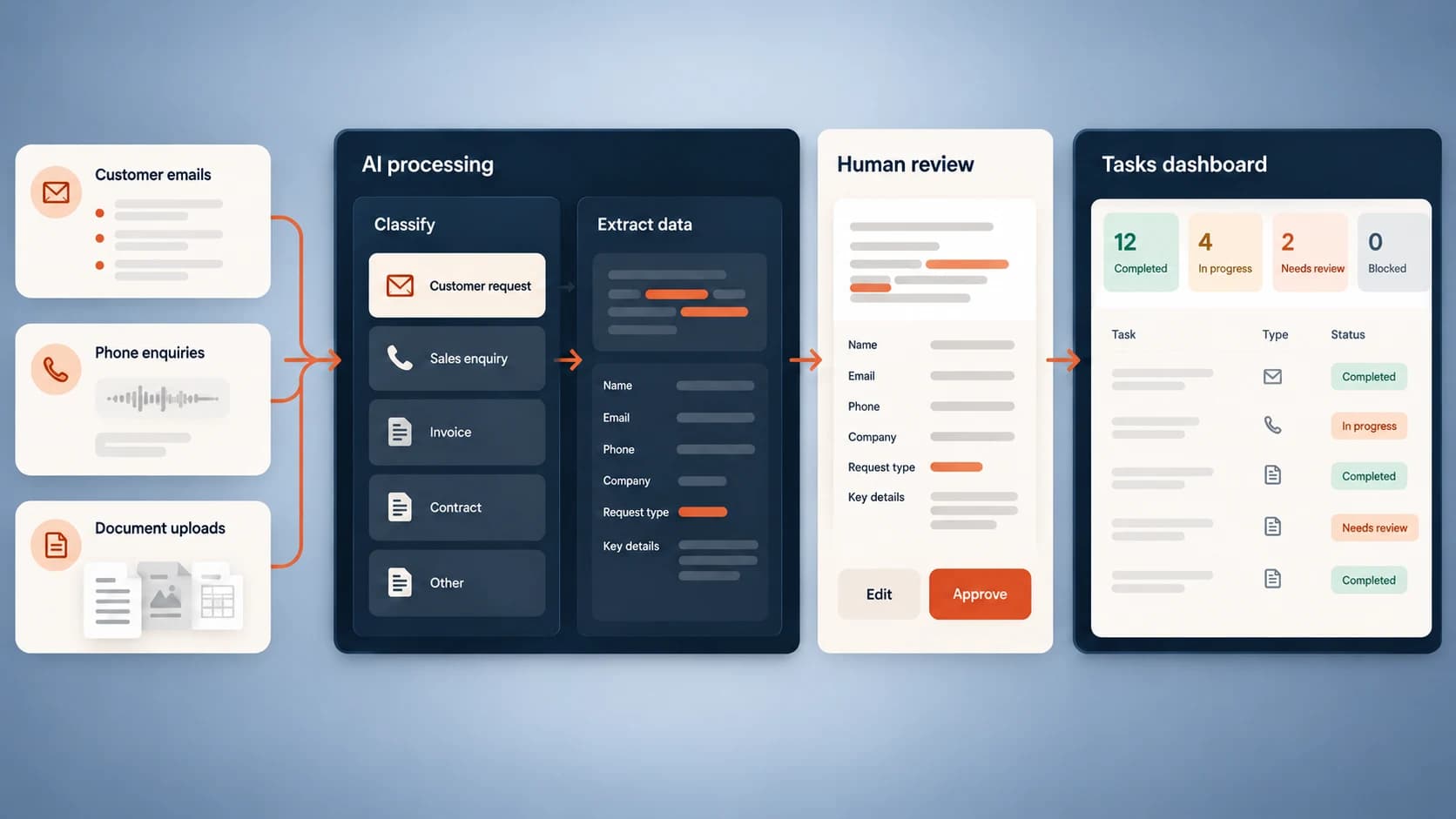
Imagine a local service company receives enquiries through a contact form, email, and voicemail. Staff currently copy names and contact details into a shared sheet, decide which service the person needs, and assign a callback.
A sensible first workflow could:
- collect the form and email enquiries in one queue
- extract the customer's name, contact details, location, and requested service
- flag missing information or requests outside the service area
- create a draft callback task for the appropriate team member
- leave uncertain cases for a person to review
It should not promise prices, confirm appointments, or make decisions the team has not agreed to delegate. Those limits are part of the design, not evidence that the automation is incomplete.
Keep a Human Review Point
Automation works best when the system handles predictable work and makes exceptions obvious. Set clear rules for what can proceed and what must stop for review. For example, a document may move forward when all required fields are present and confidence is high, while unusual totals, duplicates, or missing customer details enter a review queue.
The person reviewing an item should be able to see the original information, the proposed result, and the reason it was flagged. A system that hides its work saves less time because the reviewer has to investigate from the beginning.
Run a Limited Pilot
Test the workflow on a small, representative sample. Run the old and new processes together long enough to compare their results. During the pilot, record failures rather than quietly fixing them. Those failures reveal where rules, source data, or staff instructions need improvement.
A useful pilot answers four questions:
- Does the workflow produce the right output?
- Does it reduce total handling time, including review?
- Can staff understand and correct exceptions?
- Can the business return to a manual process if the system is unavailable?
Measure the Result in Business Terms
Measure the same indicators you recorded at the start. For an enquiry workflow, that may mean average response time, weekly administration hours, missed enquiries, and the percentage that needs correction. For document processing, it may mean documents handled, review time, duplicate rate, and month-end readiness.
Avoid presenting an isolated accuracy percentage as the result. A system can be accurate on common cases and still fail on the exceptions that matter most. What matters is whether the whole process becomes more reliable and easier for the team to manage.
When Not to Automate Yet
Pause the project if the process changes every week, sensitive data has no clear handling policy, staff cannot describe the correct outcome, or the task happens too rarely to justify setup and maintenance. Improve the process first, then revisit automation.
The best first AI project is rarely the most ambitious one. It is the one a small team can understand, test, and measure. Start narrow, keep people in control, and expand only after the evidence supports it.
Altus Media Labs